
bloc.utils#
Attributes#
Functions#
|
Return the repository root (parent of the |
|
Return the absolute path to the data folder, or file inside. |
|
Load a validation dataset from |
|
Return the STONE YAML path corresponding to a concept (Bloc) YAML path. |
|
Return path (str) of a file. |
|
Return path (str) of Cantera mechanism. |
|
Make folders if not there. |
|
Add a prefix to the keys of a dictionary. |
|
Map node names to number-prefixed display names. |
|
Return names with number prefixes applied to physical nodes. |
Module Contents#
- bloc.utils.ROOT_FOLDER_PATH#
- bloc.utils.get_root()#
Return the repository root (parent of the
blocPython package).Used not to worry about the project architecture.
- Returns:
Absolute path to the checkout root (folder that contains
bloc/).- Return type:
Path
Examples
>>> from bloc.utils import get_root
>>> path = get_root() / "data" / "mechanisms" / "Fincke_GRC.yaml"
- bloc.utils.get_path_to_data(*paths, force_return=False)#
Return the absolute path to the data folder, or file inside.
- Parameters:
*paths (
str) – You can add a path to precise the folder inside.force_return (
bool, optional) – If True, return path even if does not exists, by default False.
- Returns:
The abspath to the data (or file).
- Return type:
Path
Examples
>>> from bloc.utils import get_path_to_data
>>> path = get_path_to_data("mechanisms", "Fincke_GRC.yaml")
>>> path = get_path_to_data("mechanisms", "gri30_+C(s).yaml")
- Raises:
FileNotFoundError – If the file or folder is not found.
- bloc.utils.get_validation_data(name)#
Load a validation dataset from
tests/validation_data/<name>.Validation datasets are YAML files that bundle simulation parameters (under the
parameterskey) with digitised reference data (under thereferencekey). Both tests and example scripts should use this function so that the data lives in exactly one place.- Parameters:
name (
str) – Filename, e.g."mei2019_fig2.yaml".- Returns:
Parsed YAML content. Typical keys:
parameters,reference.- Return type:
dict- Raises:
FileNotFoundError – If
tests/validation_data/<name>does not exist.
Examples
>>> from bloc.utils import get_validation_data
>>> data = get_validation_data("mei2019_fig2.yaml")
>>> params = data["parameters"]
>>> ref = data["reference"]
- bloc.utils.stone2sim(concept_yaml_path)#
Return the STONE YAML path corresponding to a concept (Bloc) YAML path.
Convention:
name.yaml->name_stone.yaml(e.g. used by run_concept.py vs run_yaml.py in SPRING_A3). This helper only computes a filename/path mapping; it does not execute Boulder conversion commands.- Parameters:
concept_yaml_path (
strorPath) – Path to the concept/config YAML (e.g. SPRING_A3_BG_20260212.yaml).- Returns:
Path to the STONE counterpart (e.g. SPRING_A3_BG_20260212_stone.yaml).
- Return type:
Path
Examples
>>> from bloc.utils import stone2sim
>>> stone2sim("SPRING_A3_BG_20260212.yaml").name
'SPRING_A3_BG_20260212_stone.yaml'
>>> stone2sim(Path("models/SPRING_A3/SPRING_A3_BG_20260212.yaml")).name
'SPRING_A3_BG_20260212_stone.yaml'
- bloc.utils.get_file_path(file_str)#
Return path (str) of a file.
File is looked up from (in order):
An absolute path (if exists) or relative path from the working directory
A relative path from the calling script’s folder.
- bloc.utils.get_mechanism_path(mechanism_str)#
Return path (str) of Cantera mechanism.
Mechanism is looked up from (in order):
An absolute path (if exists) or relative path from the working directory
A relative path from the calling script’s folder.
The /bloc/data/mechanism directory
The /cantera/data directory
The mechanism name must include the
.yamlextension.Mechanism can then be fed to a
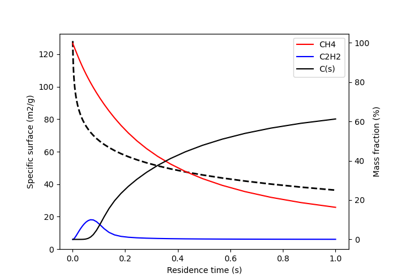
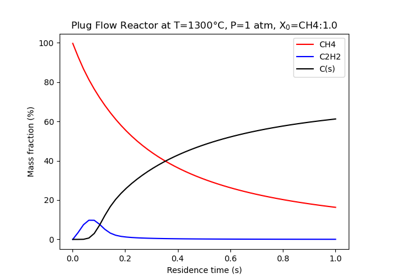
cantera.Solutionobject.Examples





- bloc.utils.make_folders(path, folders)#
Make folders if not there.
- Parameters:
path (
str) – where to create foldersfolders (
listorstr) – folders to create
- bloc.utils.add_prefix_to_dict_keys(d, prefix)#
Add a prefix to the keys of a dictionary.
- Parameters:
d (
dict) – The dictionary to modify.prefix (
str) – The prefix to add to the keys.
- Returns:
A new dictionary with the prefixed keys.
- Return type:
dict
- bloc.utils.get_node_number_prefix_map(physical_node_names)#
Map node names to number-prefixed display names.
- Parameters:
physical_node_names (
listofstr) – Ordered list of physical node names to prefix. The numbering follows the order of this list.- Returns:
{original_name: "[1] original_name", ...}- Return type:
dict[str,str]
- bloc.utils.apply_node_prefixes(names, physical_node_names)#
Return names with number prefixes applied to physical nodes.
Non-physical nodes (not in physical_node_names) are returned unchanged.
- bloc.utils.SPARK_COLORS#